- Home Page /
- Electronics /
- Computer Accessories /
- Computer Accessories & Peripherals /
- Input Devices /
- Graphics Tablets /
- VEIKK VK1060PRO V2 Drawing Tablet, 10 x 6 Inc...
0 ratings


Item #:
245977421
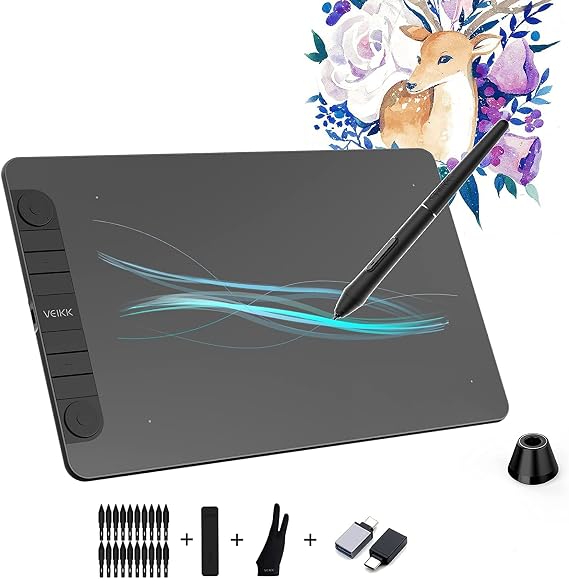
VEIKK VK1060PRO V2 Drawing Tablet, 10 x 6 Inch Graphics Pen Tablet with 8 Shortcut Keys, 8192 Levels Battery Free Supports Tilt Function, Work for
85% of respondents would recommend this to a friend
Item #:
245977421
NZD 135
Price Details
Excluding Shipping & Custom charges ( Shipping and custom charges will be calculated on checkout )
*All items will import from US
0 ratings
Write a review
In stock
 Imported from USA store
QTY:
Order now and get it around Friday, September 25
Secured transaction
Ubuy works hard to protect your security and privacy. Our advanced payment security system ensures confidentiality by encrypting your information during transmission using AES (Advanced Encryption Standards) and SSL (Secure Socket Layer) protocols. Your payment details are 100% secure as we do not share your payment details with third party sellers.
Our Top Logistics Partners


Let You Control Every Detail to Fit Your Imagination: Due to 8192 levels pen pressure sensitivity, gives you fully control and precision over the drawing, editing and retouching With the stable performance you can concentrate fully on digital art creation with our drawing tablet

Fast
Shipping

Free
Return*

Secure Packaging

100% Original Products

PCI DSS Compliance

ISO 27001 Certified



Note: Step Down Voltage Transformer required for using electronics products of US store (110-120). Recommended power converters Buy Now.


What Stands Out
Large Drawing Area
The 10 x 6 inch active area provides ample space for creativity, enabling artists to work freely and comfortably without restrictions, enhancing overall productivity during digital art creation.
High Sensitivity
With 8192 levels of pressure sensitivity and tilt function support, the tablet delivers precise control over brush thickness and opacity, translating the artist's vision into detailed, vibrant digital artwork.
Customizable Shortcuts
Equipped with 8 customizable shortcut keys, the VK1060PRO V2 boosts workflow efficiency, allowing users to create shortcuts for frequently used functions, leading to a seamless drawing experience and improved productivity.
Product Details
| Brand | VEIKK |
| Model Name | VK1060 Pro |
| Built-In Media | 28 pen nibs, 1 holder, artist glove, a transparent film, 2 OTG connector, cloth bag |
| Target Audience | Student, Teacher |
| Model Number | VK1060 Pro |
| Number of Items | 1 |
| Manufacturer | VEIKK |
| Unit Count | 1 Count |
| Number of Packs | 1 |
| Mfr Part Number | VK1060PRO |
| Connectivity Technology | USB |
| Pressure Sensitivity | 16384 levels |
| Operating System | Android 6.0 Marshmallow, Linux, Mac OS, Windows 11, Windows 7 /8/10/11 |
| Additional Features | 60u00b0 Tilt Support, Programmable Press Key, Shortcut Key |
| Specific Uses For Product | 3D Modelling /Designing, Animation, Drawing |
| Compatible Devices | Desktop, Laptop, Smartphone, Tablet |
| Display Type | LED |
| Native Resolution | 1920x1080 |
| Screen Size | 10 centimeters |
| Item Weight | 1.5 pounds (680 grams) |
| Item Dimensions L x W | 13"L x 8.5"W (33 cm) |
| Active Surface Area | 10 inches x 6 inches (25.4 cm) |
| Color | vk1060pro |
| Special Feature | 60u00b0 Tilt Support, Programmable Press Key, Shortcut Key |
Dangerous Goods
To avoid the delay in customs clearance process for Dangerous Goods, the shipment shall be opened at our warehouse facility to check the severity of hazardous components. Please see the list of Dangerous goods here.
Who Should Buy?

-
Digital Artists
Ideal for digital artists who need precision and sensitivity in their artwork, offering 8192 pressure levels.
-
Graphic Designers
Great for graphic designers seeking a reliable and cost-effective tool to create professional designs.
-
Students and Hobbyists
Perfect for students and hobbyists exploring digital art, providing an affordable entry-level drawing experience.

-
3D Animators
Not suitable for 3D animators needing advanced features, as it lacks a dedicated stylus grip and additional customizable options.
Product Description
VEIKK VK1060PRO V2 Drawing Tablet, 10 x 6 Inch Graphics Pen Tablet with 8 Shortcut Keys, 8192 Levels Battery Free Supports Tilt Function, Work for Digital Art Drawing, Designing
About This Item
Introducing the VEIKK A30 Graphic Drawing Tablet: Unleash Your Creativity Are you a digital artist searching for the perfect drawing tablet that combines intuitive features, precise control, and affordability? Look no further than the VEIKK A30 Graphic Drawing Tablet. With its sleek design and advanced functionality, this tablet is designed to take your creativity to new heights. Featuring a 10 x 6-inch working area, the VEIKK A30 provides plenty of space for your artistic expressions. With 8192 levels of pressure sensitivity, you'll enjoy smooth and precise pen control, allowing you to create stunning digital artwork with ease.
Whether you're a beginner or a professional artist, this tablet offers the ideal canvas for your imagination. One of the standout features of the VEIKK A30 is its 4 touch keys and 1 touch panel. These customizable buttons provide convenient shortcuts and easy access to commonly used functions, allowing you to work more efficiently and streamline your workflow. Say goodbye to endless menu navigation and hello to instant shortcuts, empowering you to focus on your creativity. Designed to enhance your drawing experience, the VEIKK A30 is compatible with both Linux and Android systems, making it suitable for a wide range of artists, no matter their preferred operating system.
Whether you're creating digital illustrations or editing photos, this tablet supports a variety of software applications, ensuring seamless integration into your creative process. The VEIKK A30 also comes with an artist's glove, providing a smooth and comfortable drawing experience. This glove reduces friction and prevents smudging, allowing your hand to glide effortlessly across the tablet surface. Say goodbye to messy fingerprints and hello to clean and precise artwork. With its wireless connectivity, the VEIKK A30 allows you to work freely without the constraints of cables.
Experience the freedom of movement as you bring your creative visions to life. Whether you're at home, in the studio, or on the go, this tablet offers the flexibility and convenience you need to create wherever inspiration strikes. Not only is the VEIKK A30 an affordable option for artists, but it also offers exceptional value for the price. With its high-quality construction, advanced features, and impressive performance, this tablet stands out as a top choice in the market.
Discover why countless artists around the world trust the VEIKK A30 for their digital artwork. So whether you're a beginner looking to explore the world of digital art or a professional seeking a reliable and versatile tool, the VEIKK A30 Graphic Drawing Tablet is the perfect companion for your creative journey. Unleash your imagination and bring your ideas to life with this exceptional drawing tablet. Shop now and experience the next level of digital artistry.
Have any Query? Chat with us
Customer Questions & Answers
-
Question:
What operating systems does the VEIKK A30 support?
Answer: The VEIKK A30 is compatible with multiple operating systems including Linux and Android. This versatility allows users across different platforms to utilize the tablet for various artistic applications, ensuring a broad reach for digital artists and designers. Whether you're sketching on a smartphone via Android or using it with a Linux-based system, the tablet provides a seamless experience for illustration, graphic design, and photo editing. -
Question:
What are the unique features of the VEIKK A30 drawing tablet?
Answer: The VEIKK A30 boasts four customizable touch keys and a touch panel that enhance your drawing experience. These features allow you to quickly access frequently used tools and shortcuts, significantly improving workflow and efficiency. Whether you're an illustrator needing fast brush changes or a graphic designer seeking to streamline your design process, these functionalities offer valuable convenience. -
Question:
Does the VEIKK A30 come with a stylus pen?
Answer: Yes, the VEIKK A30 includes a stylus pen designed for precision and comfort. This pen facilitates fine details and intricate designs, making it perfect for both sketching and professional artwork. Its ergonomic design ensures prolonged use without discomfort, thereby accommodating a range of artistic styles from detailed illustrations to rapid concept sketches. -
Question:
Can I use the VEIKK A30 for professional artwork?
Answer: Absolutely, the VEIKK A30 is designed for both amateur and professional artists. Its high sensitivity levels and responsive touch panel allow for intricate detail, making it suitable for professional projects and creative work. Artists can create digital paintings, design graphics, or even animate, all while taking advantage of its versatile features. -
Question:
How portable is the VEIKK A30 drawing tablet?
Answer: The VEIKK A30 is lightweight and compact, making it a highly portable option for artists on the go. Whether you're sketching in a café or working at a client's site, you can easily pack it into a bag. Its modest size doesn't compromise its performance, which allows you to create quality art wherever inspiration strikes. -
Question:
What is the pressure sensitivity of the VEIKK A30?
Answer: The VEIKK A30 features high pressure sensitivity levels that provide fine-tuned control over line thickness and opacity. This attribute is particularly beneficial for artists as it closely mimics the natural feel of traditional drawing tools. From delicate strokes to bold lines, the sensitivity helps artists achieve their desired results seamlessly. -
Question:
Is the VEIKK A30 suitable for gaming?
Answer: While primarily designed as a drawing tablet, the VEIKK A30's touch capabilities and customizable keys can also enhance gaming experiences, especially for strategy or simulation games. Gamers can map key functions to the tablet for quicker actions, adding a unique layer of gameplay interactivity. However, it's essential to note that it's primarily intended for creative use. -
Question:
What type of glove is recommended to use with the VEIKK A30?
Answer: It is recommended to use an artist's glove that is specifically designed to complement drawing tablets like the VEIKK A30. This helps reduce friction between hand and tablet surface and prevents smudging on the screen. A glove with a smooth surface can enhance the drawing experience, allowing for a fluid motion while keeping your digitization clean. -
Question:
How can I customize the touch keys on the VEIKK A30?
Answer: Customizing the touch keys on the VEIKK A30 involves accessing its driver software, where you can assign specific functions to each key. This feature allows you to set up shortcuts for the tools you use most frequently. By tailoring the tablet to match your individual workflow preferences, artists can create more efficiently, adapting to their unique styles and methods. -
Question:
Where can I buy the Graphic Drawing Tablet VEIKK A30?
Answer: You can purchase the Graphic Drawing Tablet VEIKK A30 from Ubuy in Cook Islands. Ubuy offers a convenient platform to explore this digital drawing pad, along with other accessories that may enhance your drawing experience. Given Ubuy's wide range of products and user-friendly interface, it's a great place to find and order the VEIKK A30 easily.
VEIKK Graphics Tablets VK1060 Pro Editorial Review
VEIKK VK1060PRO V2 Drawing Tablet, 10 x 6 Inch Graphics Pen Tablet with 8 Shortcut Keys, 8192 Levels Battery Free Supports Tilt Function, Work for Digital Art Drawing, Designing. Users appreciate the tablet for its smooth and precise drawing experience, with many noting the comfort and responsiveness of the pen, which does not require charging. The customizable shortcut keys enhance workflow efficiency, making it suitable for both beginners and experienced digital artists. While some users found the initial setup challenging due to a lack of instructions, they reported that once familiar, the tablet became a reliable tool, outperforming some established brands in functionality.
Customer Reviews & Ratings
1 customers ratings
-
5 Star
100%
-
4 Star
0%
-
3 Star
0%
-
2 Star
0%
-
1 Star
0%
Review this product
Share your thoughts with other customers
Pros
- 8192 levels of pressure sensitivity for fine detail
- Battery-free pen offers convenience during use
- Supports multiple operating systems for flexibility
- Large drawing area suitable for various projects
- Comfortable design enhances user experience
Cons
- Initial setup may require a bit of trial and error
Platform Trust & Buyer Confidence

JK
Jasmin
Verified buyer
“Great products and very good service: very easy and very fast international delivery.”
9 September 2026 · via Trustpilot
AG
Anke
Verified buyer
“Wonderful online shopping experience, smooth transaction from the start. Payment method works conveniently and delivery is unexpectedly fast and reliable. You go the extra mile for service. What makes this even more amazing, you deliver to Namibia. I will remain a happy Ubuy customer and will increase my purchases for sure! Thank you!”
10 September 2026 · via Trustpilot
H
Hazel
Verified buyer
“Very easy to find the products what you need, and so fast delivery, that’s why I highly recommended to others costumers to used ubuy.”
10 September 2026 · via Trustpilot
O
Opaleye
Verified buyer
“I received exactly what I ordered I was skeptical about your site because that was my first time to order. But the order came timely and neatly packaged. I was not disappointed. Thank you.”
11 September 2026 · via Trustpilot
AC
Adele
Verified buyer
“Easy to find and order what you want on the website. Delivery is quick to the UK”
8 September 2026 · via Trustpilot
Secure Checkout
Global Delivery
Easy Returns
Genuine Products
Product Price History
Important information
- Limitations : For products shipped internationally, please note that any manufacturer warranty may not be valid; manufacturer service options may not be available; product manuals, instructions, and safety warnings may not be in destination country languages; the products (and accompanying materials) may not be designed in accordance with destination country standards, specifications, and labeling requirements; and the products may not conform to destination country voltage and other electrical standards (requiring use of an adapter or converter if appropriate). The recipient is responsible for assuring that the product can be lawfully imported to the destination country. When ordering from Ubuy or its affiliates, the recipient is the importer of record and must comply with all laws and regulations of the destination country.
- Not all the products listed on Ubuy are for sale, as Ubuy is a global search engine. Products are subject to export/trade regulations.
NZD 135
Order now and get it around Friday, September 25
This item is not restrict in my country.(Please click on above link if this item is not restrict in your country, So our team will review and allow.)
QTY:
Secured transaction
PCI DSS compliant and ISO 27001:2022 certified, with encrypted payments and full buyer protection on every order.
Our Top Logistics Partners
Fastest cross-border delivery
Features & Benefits
- 8192 levels pen pressure sensitivity for full control and precision
- Compatible with Windows, Mac OS, Android and Linux
- No need for battery replacement or charging
- Type-c port designed for stable use
- Adjustable drawing area to meet all your needs
- Bigger space for full arm usage and range of motion
Ubuy Assurance
Experience worry-free shopping with 100% original products, PCI DSS-compliant payment security, ISO 27001-certified data protection, the fastest cross-border delivery, free returns *, and secure packaging on every order.