- Home Page /
- Mobile Phone Accessories /
- Accessories /
- Stylus Pens /
- Logitech Crayon Digital Pencil for iPad (USB C Port Com...
0 ratings




Item #:
222076437
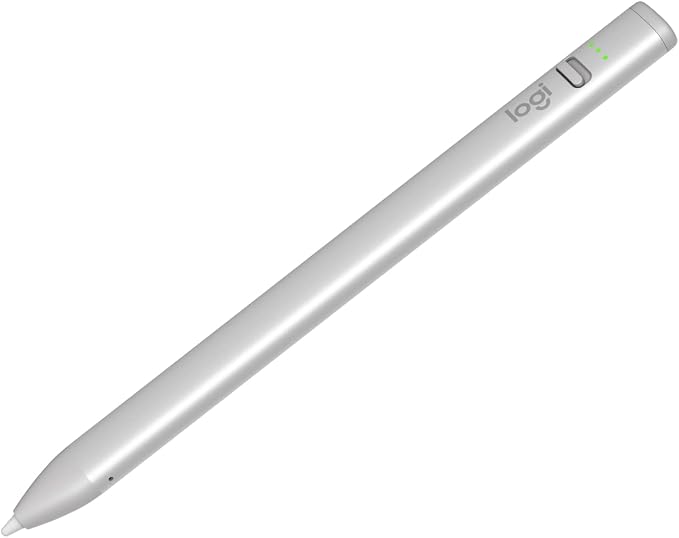
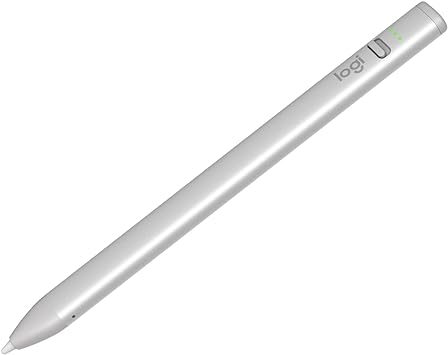
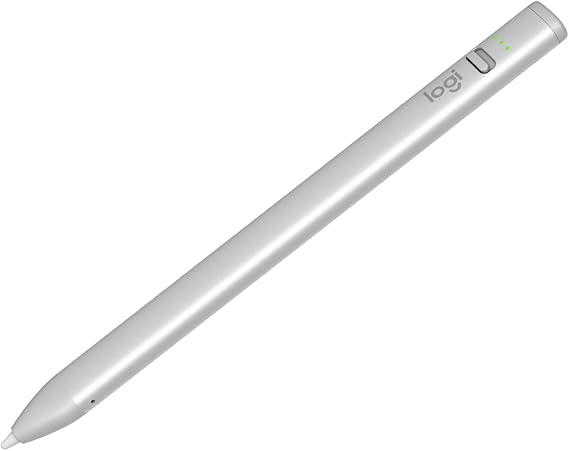
Logitech Crayon Digital Pencil for iPad (USB C Port Compatibility Only) Featuring Apple Pencil Technology, No Lag Pixel-Precision, and Dynamic Smart
Item #:
222076437
NZD 106
Price Details
Excluding Shipping & Custom charges ( Shipping and custom charges will be calculated on checkout )
*All items will import from US
35%
In stock
 Imported from USA store
QTY:
Only 3 items left in stock.
Order now and get it around Wednesday, July 15
Secured transaction
Ubuy works hard to protect your security and privacy. Our advanced payment security system ensures confidentiality by encrypting your information during transmission using AES (Advanced Encryption Standards) and SSL (Secure Socket Layer) protocols. Your payment details are 100% secure as we do not share your payment details with third party sellers.
Our Top Logistics Partners


Logitech Crayon is a versatile, pixel-precise digital pencil that unlocks what’s possible in the classroom, elevating the way teachers teach and students learn.

Fast
Shipping

Free
Return*

Secure Packaging

100% Original Products

PCI DSS Compliance

ISO 27001 Certified


Note: Step Down Voltage Transformer required for using electronics products of US store (110-120). Recommended power converters Buy Now.


What Stands Out
Apple Pencil Technology
Utilizes advanced Apple Pencil technology for seamless and precise handwriting, allowing users to create and annotate effortlessly on their iPad.
Anti-roll Design
The unique anti-roll design prevents the pencil from rolling off surfaces, ensuring a hassle-free experience and easy access whenever you need it.
Dynamic Smart Tip
Equipped with a dynamic smart tip that adjusts pressure sensitivity, providing a natural drawing experience while enhancing precision and control for artists and note-takers alike.
Product Details
- Compatibility: For all iPads 2018 and later.
- Digital Stylus Pen: Logitech Crayon uses Apple Pencil technology so you can write and draw naturally in pixel-perfect precision without missing a single line or detail
- Thick or Thinner Lines: Just tilt this iPad stylus pencil and the smart tip will adjust line weight automatically to the needed thick or thin size
- Instant Connection: This Logitech stylus pen for iPad connects to iPad instantly—just slide down the off/on switch and start writing; no device pairing or other delays required
- Fast Input: Logitech Crayon stylus for iPad delivers precise and fast input with hundreds of indispensable Apple Pencil supported apps and the list is growing bigger every day
- No Rolling: Logitech Crayon has a flat shape and doesn’t roll away when you put it down; throw it in a bag or stick it in your pocket assured that Logitech Crayon is tough enough to go anywhere you do
- USB-C: The Crayon Apple iPad stylus pen charges via USB-C and gets up to 7 hrs of writing time from a single charge; the power level indicator lights lets you know how much charge remains
- Uses FSC-certified paper for responsible packaging
| Number of Batteries | 1 Lithium Polymer batteries required. (included) |
| Battery Average Life Standby | 7 Hours |
| Compatible Devices | Tablet |
| Battery Description | Lithium |
| Minimum Required Operating System Version | iPadOS 16 |
| Item Weight | 20 Grams |
| Item Dimensions | 6.42 x 0.47 x 0.31 inches (16.3 x 1.2 x 0.8 cm) |
| Color | Silver |
| Enclosure Material | Aluminum |
| Brand | Logitech |
| Model Number | 914-000070 |
| Are Batteries Included | Yes |
| Are Batteries Required | Yes |
| UPC | 097855180742 |
| Global Trade Identification Number | 00097855180742 |
| Unit Count | 1.0 Count |
| Manufacturer | Logitech |
| Mfr Part Number | 914-000070 |
| Built-In Media | Crayon Stylus, Quick Start Guide |
| Material | Aluminum |
| Item dimensions L x W x H | 6.42 x 0.47 x 0.31 inches (16.3 x 1.2 x 0.8 cm) |
| Batteries Required? | Yes |
What's in the box
Crayon Stylus
Quick Start Guide
Who Should Buy?

-
Students
Ideal for students who take notes, sketch, or annotate documents on their iPad efficiently using precise control.
-
Artists
Great for digital artists who want to create illustrations or designs with a natural writing experience and precision.
-
Educators
Helpful for teachers in demonstrating concepts and engaging students through interactive lessons on the iPad.

-
Professional Designers
May not be suited for professional designers needing advanced pressure sensitivity and advanced features of the Apple Pencil.
-
Casual Users
Casual users who rarely use a stylus may find limited value and benefit in investing in this digital pencil.
-
Gaming Enthusiasts
Not ideal for gamers seeking precision controls and tactile feedback for gaming applications, as it focuses on drawing and notes.
Product Description
Have any Query? Chat with us
Customer Questions & Answers
-
Question:
What devices are compatible with the Logitech Crayon Digital Pencil?
Answer: The Logitech Crayon Digital Pencil is designed specifically for iPads that feature USB-C ports, ensuring seamless compatibility. This includes newer models of the iPad Pro, iPad Air, and iPad mini. The precise synergy between the Crayon and Apple's technology allows users to take full advantage of drawing apps, note-taking software, and other creative applications. -
Question:
How does the no-lag pixel-precision feature work?
Answer: The no-lag pixel-precision feature of the Logitech Crayon allows for instantaneous response between your hand movements and what you see on the screen. This is achieved through advanced Apple technology that captures input without noticeable delay. Whether you're drawing intricate details or writing quickly, this ensures a smooth and fluid experience that feels natural, making it ideal for artists and students alike. -
Question:
What is the benefit of the dynamic smart tip?
Answer: The dynamic smart tip of the Logitech Crayon adapts to the pressure and tilt of your hand movements, providing a versatile drawing experience. It allows for different line thicknesses and shading effects, similar to a traditional pencil. This feature is essential for artists who want to create more depth in their sketches or notes, giving them the freedom to express their creativity without limitations. -
Question:
Can I use the Logitech Crayon for note-taking and drawing on the same iPad?
Answer: Absolutely! The Logitech Crayon is versatile and perfect for both note-taking and drawing tasks. You can easily switch between writing down meeting notes and sketching ideas without changing tools. This makes it a great asset for students and professionals who need a reliable tool that caters to various tasks, enhancing productivity and creativity. -
Question:
Is the Logitech Crayon rechargeable?
Answer: Yes, the Logitech Crayon features a fast charge capability, allowing you to quickly power up the device for extended use. The attached USB-C port enables convenient charging, and a single charge can provide several hours of usage. This ensures that you stay productive throughout the day, whether working on projects, taking class notes, or engaging in creative sessions. -
Question:
What types of applications work best with the Logitech Crayon?
Answer: The Logitech Crayon is compatible with a wide array of applications designed for drawing, note-taking, and annotation. Popular apps include Apple Notes, Procreate, Adobe Fresco, and Microsoft OneNote, among others. Its precision and responsiveness enhance the functionality of these applications, making it easier to produce high-quality work, whether you’re a student, artist, or professional. -
Question:
Does the Logitech Crayon support palm rejection?
Answer: Yes, the Logitech Crayon features palm rejection technology, which allows you to rest your hand on the screen while using the pencil without interference. This means you can write or draw comfortably without accidental strokes. This feature is particularly advantageous for artists and students who want to maintain fluidity in their work without the distraction of unintentional lines. -
Question:
Is the Logitech Crayon suitable for children?
Answer: Certainly! The Logitech Crayon is an excellent tool for children, designed for ease of use and durability. Its sturdiness makes it less prone to breakage compared to traditional styluses, and its intuitive design allows kids to use it without difficulty. This opens up a world of creativity for kids, whether they’re drawing, learning to write, or engaging in educational apps. -
Question:
What color options are available for the Logitech Crayon?
Answer: The Logitech Crayon is typically available in a classic light grey color, which offers a clean and professional appearance. This neutral design appeals to a wide audience, making it an attractive accessory for both young students and adults. The minimalist aesthetic allows users to express their personal style while maintaining functionality. -
Question:
Where can I buy the Logitech Crayon Digital Pencil?
Answer: You can purchase the Logitech Crayon Digital Pencil from Ubuy in Cook Islands. Ubuy offers a reliable online shopping experience, along with various options for delivery. Whether you're looking to enhance your drawing skills or streamline your note-taking, Ubuy carries the product that meets your needs.
Logitech Stylus Pens 914-000070 Editorial Review


No editorial reviews found
Customer Reviews & Ratings
841 customers ratings
-
5 Star
76%
-
4 Star
10%
-
3 Star
5%
-
2 Star
4%
-
1 Star
5%
Review this product
Share your thoughts with other customers
Platform Trust & Buyer Confidence

MT
Mohd
Verified buyer
“The product received very good packaging & safe…Thank You”
16 June 2026 · via Trustpilot
SJ
Shawati
Verified buyer
“Accurate delivery timing given”
16 June 2026 · via Trustpilot
YB
Youcef
Verified buyer
“Not madly expensive like I thought, and much quicker than promised.”
15 June 2026 · via Trustpilot
LM
Leila
Verified buyer
“Never dealt with Ubuy before, but everything worked out great. Seamless cross border purchasing and shipping. Thanks!”
6/7/2026 · via Trustpilot
KA
Kwame
Verified buyer
“The process was smooth, with clear communication and timelines. This was my 1st purchase and I am really impressed. I will definitely be coming back.”
12 June 2026 · via Trustpilot
Secure Checkout
Global Delivery
Easy Returns
Genuine Products
Product Price History
Important information
- Limitations : For products shipped internationally, please note that any manufacturer warranty may not be valid; manufacturer service options may not be available; product manuals, instructions, and safety warnings may not be in destination country languages; the products (and accompanying materials) may not be designed in accordance with destination country standards, specifications, and labeling requirements; and the products may not conform to destination country voltage and other electrical standards (requiring use of an adapter or converter if appropriate). The recipient is responsible for assuring that the product can be lawfully imported to the destination country. When ordering from Ubuy or its affiliates, the recipient is the importer of record and must comply with all laws and regulations of the destination country.
- Not all the products listed on Ubuy are for sale, as Ubuy is a global search engine. Products are subject to export/trade regulations.
NZD 106
Order now and get it around Wednesday, July 15
This item is not restrict in my country.(Please click on above link if this item is not restrict in your country, So our team will review and allow.)
QTY:
Only 3 items left in stock.
Secured transaction
Ubuy works hard to protect your security and privacy. Our advanced payment security system ensures confidentiality by encrypting your information during transmission using AES (Advanced Encryption Standards) and SSL (Secure Socket Layer) protocols. Your payment details are 100% secure as we do not share your payment details with third party sellers.
Our Top Logistics Partners
Fastest cross-border delivery
Features & Benefits
- Versatile and pixel-precise digital pencil for iPad.
- Encourages creativity with hundreds of Apple Pencil supported apps.
- Designed for comfort and durability; fits all hand sizes.
- 4 ft drop protection and tough enough for student life.
- Quick recharging for extended writing time, up to 7 hours on a single charge.
- Smart tip feature adjusts line weight for clear, readable notes.