- Home Page /
- Electronics /
- Computer Accessories /
- Computer Accessories & Peripherals /
- Keyboards, Mice & Accessories /
- Keyboard & Mouse Combos /
- ProtoArc Backlit Bluetooth Keyboard and Mouse...
0 ratings

Item #:
220609114
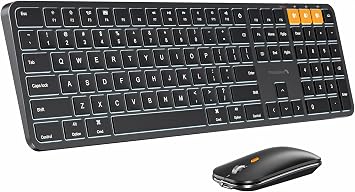
ProtoArc Backlit Bluetooth Keyboard and Mouse for Mac, KM100-A Full Size Wireless Keyboard Mouse for Mac, Multi-Device, Rechargeable, No USB, for
Item #:
220609114
NZD 146
Price Details
Excluding Shipping & Custom charges ( Shipping and custom charges will be calculated on checkout )
*All items will import from US
0 ratings
Write a review
In stock
 Imported from USA store
QTY:
Order now and get it around Sunday, July 05
Secured transaction
Ubuy works hard to protect your security and privacy. Our advanced payment security system ensures confidentiality by encrypting your information during transmission using AES (Advanced Encryption Standards) and SSL (Secure Socket Layer) protocols. Your payment details are 100% secure as we do not share your payment details with third party sellers.
Our Top Logistics Partners


Our wireless keyboard and mouse for mac are compatible with MAC OS 12.2 or later, and compatible for MacBook, MacBook Pro, MacBook Air, iMac, iMac Pro, Mac Pro/Mini, iPad, or iPhone

Fast
Shipping

Free
Return*

Secure Packaging

100% Original Products

PCI DSS Compliance

ISO 27001 Certified


Note: Step Down Voltage Transformer required for using electronics products of US store (110-120). Recommended power converters Buy Now.


What Stands Out
Multi-Device Connectivity
Easily switch between three devices with seamless Bluetooth connectivity, making it a perfect choice for multitaskers using Mac, iPhone, or iPad.
Rechargeable Design
With a long-lasting rechargeable battery, this keyboard and mouse combo delivers extended use without the hassle of constant battery replacements.
Sleek Aesthetic
The elegant Space Gray finish complements Apple devices, enhancing your workspace while providing comfort and functionality for prolonged use.
Product Details
| Item Weight | 1.5 lbs (680 grams) |
Who Should Buy?

-
Mac Users
Ideal for users with MacBook Pro/Air, enhancing the typing experience with tailored features and seamless connectivity.
-
Mobile Professionals
Perfect for on-the-go professionals needing a portable, reliable solution that works across multiple devices effortlessly.
-
Creative Types
Great for creatives who appreciate backlit keys and stylish design, combining functionality with aesthetic appeal.

-
Gaming Enthusiasts
Not suitable for gamers who require high-speed response times and advanced features typical of gaming keyboards.
-
Windows Users
Less effective for Windows users due to lacking compatibility features, limiting its usability on non-Mac devices.
-
Ergonomic Seekers
May not meet the needs of those seeking ergonomic designs, as comfort features are minimal compared to specialized options.
Product Description
ProtoArc Backlit Bluetooth Keyboard and Mouse for Mac, KM100-A Full Size Wireless Keyboard Mouse for Mac, Multi-Device, Rechargeable, No USB, for MacBook Pro/Air, iPhone, iPad, Space Black
Have any Query? Chat with us
Customer Questions & Answers
-
Question:
What devices are compatible with the ProtoArc Backlit Bluetooth Keyboard and Mouse?
Answer: The ProtoArc Backlit Bluetooth Keyboard and Mouse are primarily designed for use with Mac devices, including MacBook, iMac, and Mac Mini. These peripherals leverage Bluetooth connectivity, making them compatible with any Mac device that supports Bluetooth functionality. Additionally, they can also connect to iPads and iPhones with Bluetooth capability, allowing seamless multi-device use. This feature is perfect for professionals who work across multiple Apple devices, enabling efficient switching between devices while maintaining a consistent typing and navigation experience. -
Question:
How do I charge the ProtoArc KM100-A Keyboard and Mouse?
Answer: The ProtoArc KM100-A Keyboard and Mouse come with rechargeable batteries that can be easily charged via USB-C. To charge, simply connect the provided USB-C cable to the devices and to a power source. A full charge typically provides long-lasting usage, ensuring that you can work for extended periods without interruption. This is particularly beneficial in office environments or during long work sessions where constant power supply might not be feasible. -
Question:
Can I use the ProtoArc Backlit Keyboard and Mouse with non-Mac devices?
Answer: While the ProtoArc Backlit Keyboard and Mouse are optimized for Mac devices, they can also connect to other Bluetooth-enabled devices, including Windows and Android systems. However, some specific Mac functions may not be fully supported on non-Mac systems, and users might experience some differences in layout or functionality. This versatility allows users to enjoy these peripherals with a wide range of devices, making them excellent for those who switch between operating systems regularly. -
Question:
What is the significance of the backlit feature in the ProtoArc keyboard?
Answer: The backlit feature on the ProtoArc keyboard enhances visibility in low-light environments, which is especially useful for nighttime work or dimly lit settings. The adjustable brightness settings allow users to customize the intensity of the backlight based on their preferences and surroundings, ensuring that typing remains comfortable and efficient. This feature is ideal for professionals who often work late or enjoy burning the midnight oil. -
Question:
How do I switch between devices using the ProtoArc Keyboard and Mouse?
Answer: Switching between devices on the ProtoArc Keyboard and Mouse is simple and efficient. Both peripherals support multi-device connectivity, allowing users to toggle between up to three connected devices with just a press of a button. This is particularly useful for multitaskers who need to switch from a MacBook to an iPad or other Bluetooth-enabled devices quickly. This functionality streamlines workflow, enabling users to maintain focus and productivity across different platforms. -
Question:
What are the dimensions and weight of the ProtoArc KM100-A Keyboard and Mouse?
Answer: The ProtoArc KM100-A Wireless Keyboard and Mouse have a compact and lightweight design, making them ideal for both desktop setups and on-the-go usage. The keyboard's dimensions provide a full-sized layout that ensures a comfortable typing experience, while the mouse is designed for ergonomic ease. This lightweight design allows users to easily transport these peripherals without adding significant bulk to their bags, making them perfect for travel or commuting. -
Question:
Are there customizable keys on the ProtoArc Keyboard?
Answer: Yes, the ProtoArc Backlit Keyboard offers customizable function keys which can be tailored to suit your workflow. Users can assign specific commands or functions to improve productivity based on individual needs. This feature is particularly beneficial for professionals who use specific software programs frequently, allowing for a personalized touch that can speed up repetitive tasks or enhance convenience during usage. -
Question:
What type of materials are used in the construction of the ProtoArc Keyboard and Mouse?
Answer: The ProtoArc Keyboard and Mouse are constructed from high-quality, durable materials designed to withstand everyday use. The keyboard features a robust chassis that supports the keys well, providing a solid typing surface, while the mouse is ergonomically designed for comfort. This attention to material quality ensures longevity and reliability, making it suitable for various users, from casual to professional. -
Question:
How do I reset the Bluetooth connection for the ProtoArc devices?
Answer: To reset the Bluetooth connection on the ProtoArc Keyboard and Mouse, simply power off the devices and then turn them back on. Afterward, enter the pairing mode by following the specific connection buttons indicated in the user manual. This could be useful if you’re experiencing connectivity issues or need to reconnect to a device. This resetting process ensures a stable and reliable connection across your devices. -
Question:
Where can I buy ProtoArc Backlit Bluetooth Keyboard and Mouse for Mac, KM100-A Full Size Wireless Keyboard Mouse for Mac, Multi-Device Rechargeable for MacBook in Cook Islands?
Answer: You can purchase the ProtoArc Backlit Bluetooth Keyboard and Mouse for Mac from Ubuy in Cook Islands. Ubuy offers a wide range of products and delivers them right to your doorstep. Their platform is designed to provide a seamless shopping experience, ensuring you get your desired gadgets with ease and convenience.
ProtoArc Keyboard & Mouse Combos Editorial Review
No editorial reviews found
Customer Reviews & Ratings
1 customers ratings
-
5 Star
100%
-
4 Star
0%
-
3 Star
0%
-
2 Star
0%
-
1 Star
0%
Review this product
Share your thoughts with other customers
Product Price History
Important information
- Limitations : For products shipped internationally, please note that any manufacturer warranty may not be valid; manufacturer service options may not be available; product manuals, instructions, and safety warnings may not be in destination country languages; the products (and accompanying materials) may not be designed in accordance with destination country standards, specifications, and labeling requirements; and the products may not conform to destination country voltage and other electrical standards (requiring use of an adapter or converter if appropriate). The recipient is responsible for assuring that the product can be lawfully imported to the destination country. When ordering from Ubuy or its affiliates, the recipient is the importer of record and must comply with all laws and regulations of the destination country.
- Not all the products listed on Ubuy are for sale, as Ubuy is a global search engine. Products are subject to export/trade regulations.
NZD 146
Order now and get it around Sunday, July 05
This item is not restrict in my country.(Please click on above link if this item is not restrict in your country, So our team will review and allow.)
QTY:
Secured transaction
Ubuy works hard to protect your security and privacy. Our advanced payment security system ensures confidentiality by encrypting your information during transmission using AES (Advanced Encryption Standards) and SSL (Secure Socket Layer) protocols. Your payment details are 100% secure as we do not share your payment details with third party sellers.
Our Top Logistics Partners
Fastest cross-border delivery
Features & Benefits
- Compatible with MAC OS 12.2 or later
- Backlit illuminated Keys for easy typing in dim environments
- Swift and Quiet Typing with responsive scissor keys
- Multimedia or F1-F12 function available
- Wireless and ergonomic design
- Charging indicator and auto backlight off feature